

Projects
One folder holds your complete testware, suites, cases, plans, keywords, environments. Plain files, designed to live in Git.
A Project is your testware in one folder, it lives on your device and syncs via Git. Test cases, test plans, reusable keywords, environment definitions, the tooling the agent may use: every artifact is a plain file.
| Folder / file | In tester terms | Example |
|---|---|---|
tests/ | Test suites and test cases. A file is a case (steps, expected results); a sub-folder is a suite with its own setup.md / teardown.md (entry criteria and cleanup); rules.md = standing test instructions; ui.md = how the application under test works | checkout/pay_with_card.md |
plans/ | Test plans: which cases make up the smoke set, the regression pack, and on which device they run | smoke.yaml |
procedures/ | Keywords, as in keyword-driven testing: write a sequence once, call it from any case with parameters | login_to_ui.md |
utils/ | The permitted tooling and output conventions: built-in tools, MCP servers, custom C# tools, the report format | format.md, custom_tools/query_admin_api.cs |
devices.json | The test environments, each with its own prompt text, see Devices | , |
schedules.json | The execution schedule, recurring runs | , |
agent_workspace/ | Test evidence: execution logs, reports, screenshots. Generated per run, not versioned | , |
Test case formats: Markdown is the default, but the runner also reads
.txt, .csv, one case per row, the natural fit for data-driven testing,
.pdf (an exported or scanned specification can be executed directly), and
.json.
A new Project comes pre-seeded with this scaffold, fill in the placeholders instead of starting blank.
Git: Versioning & Sync
Every artifact above is a plain text file, deliberately. A Project is persisted as code and synchronized via Git, which gives you configuration management of the complete testware: branches and reviews for test changes, history to diff yesterday's case against today's, and reproducibility, a colleague clones the repository and has the identical suites, environments, and toolbox.
The app has Git built in, no terminal needed for the daily loop:
Start versioning
- Click Init git in the top bar (shown when the project folder is not a
repository yet). This also writes the project's
.gitignore.
Commit and sync
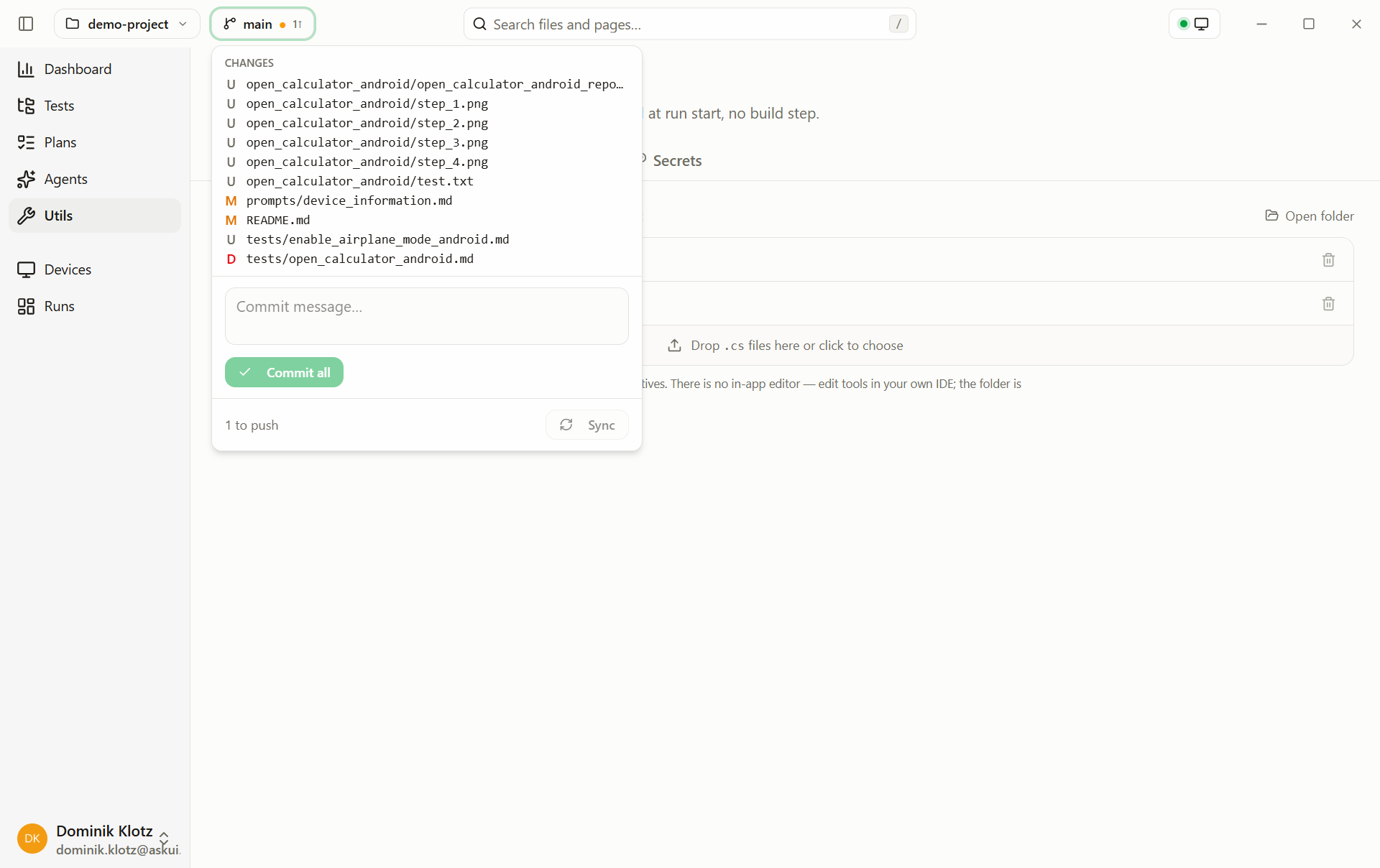
- Click the branch chip in the top bar, a dot marks uncommitted changes,
↓/↑how far you are behind/ahead of the remote. - Review the changed files, type a commit message, and commit.
- Sync pulls the remote's changes and pushes yours. Conflicts block the sync until you resolve them in the flyout, keep yours, take theirs, or mark resolved after editing.
Get an existing project
- On the Home page, choose Clone from Git and paste the repository URL
(
https://…orgit@…).
Keep run artifacts out
The seeded .gitignore excludes agent_workspace/ (test evidence,
regenerated every run) and the run cache. If a project has no
.gitignore, or run artifacts show up in the changes list, the flyout
offers Add .gitignore for run artifacts, one click. Credentials never
need ignoring: they live in the app's encrypted
secret store, not in the project folder.
The deliberately small scope, commit everything, sync, resolve, covers the tester's daily loop; branch management and partial staging stay in your Git client of choice. Which team owns which repository: Sharing the project.