

Custom tools
Give the agent a project-specific ability by dropping a C# file into utils/custom_tools/, compiled at run start, with NuGet packages per file.
A custom tool is one C# file in utils/custom_tools/. It joins the
agent's toolbox for every run of the project, for anything no built-in
covers: your product's admin API, resetting test users, seeding data.
Manage the files under Extending → Custom Tools.
Developer territory
Custom tools are C# code with full machine access, running inside every run of the project. They should be implemented and validated by your developers or the AskUI Solution Engineering team, not edited ad hoc by test authors.
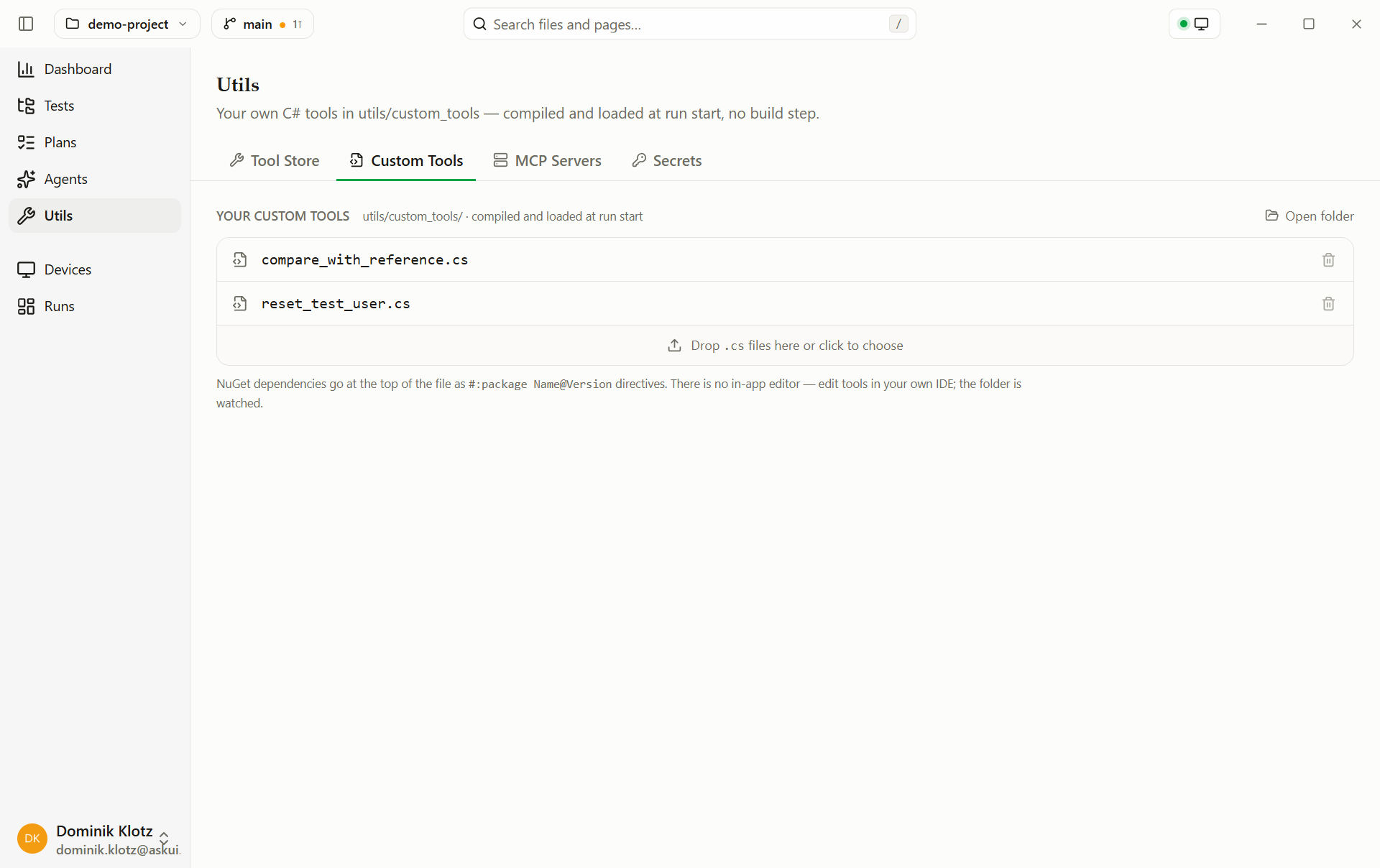
- File list: every
.csfile inutils/custom_tools/. The pen icon opens the tool in ToolForge so you can describe a change to it. The trash icon removes one: the file is deleted, the agent loses the tool on the next run. - Drop zone: drop
.csfiles or click to choose. Copying files into the folder manually works too, the folder is watched. - Open folder: opens
utils/custom_tools/in your file explorer. - Warnings: the same NuGet package requested at different versions across files is flagged; the higher version wins at run start.
There is no in-app code editor: write tools in your own IDE, or describe a change to an existing tool with its pen icon.
Or let the app draft it
You don't have to write the C# yourself: Forge a tool on the Custom Tools tab
drafts a tool from a plain-language description and writes it into
utils/custom_tools/ once you accept it. See Forge.
Create a tool
-
Write a class deriving from
Tool: a name, a description (what the agent reads to decide when to call it), an input schema, andInvokeAsync:utils/custom_tools/reset_test_user.cs public sealed class ResetTestUserTool : Tool, ISecretsConsumer { private string _apiKey = ""; public ResetTestUserTool() : base( name: "reset_test_user", description: "Resets a test user to a clean state via the admin API.", inputSchema: new JsonObject { ["type"] = "object", ["properties"] = new JsonObject { ["username"] = new JsonObject { ["type"] = "string" }, }, ["required"] = new JsonArray("username"), }) { } public void UseSecrets(IReadOnlyDictionary<string, string> secrets) => _apiKey = secrets.GetValueOrDefault("ADMIN_API_KEY", ""); public override async ValueTask<ToolResult> InvokeAsync( JsonObject input, CancellationToken cancellationToken = default) { using var http = new HttpClient(); http.DefaultRequestHeaders.Add("X-Api-Key", _apiKey); var response = await http.PostAsync( $"https://admin.example.com/api/users/{input["username"]}/reset", content: null, cancellationToken); return response.IsSuccessStatusCode ? ToolResult.FromText($"User {input["username"]} was reset.") : ToolResult.Error($"Admin API returned {(int)response.StatusCode}."); } } -
Drop the file onto Extending → Custom Tools, or save it straight into
utils/custom_tools/. -
Add the secret it uses (
ADMIN_API_KEY) under Extending → Secrets, never hard-code credentials into the file. -
Use it in a step, the file compiles when the run starts:
tests/setup.md 2. Use the reset_test_user tool for user "qa_user_1".
What the example uses, and what else a tool file can do:
-
No boilerplate: common namespaces (
System,System.Net.Http,System.Text.Json.Nodes, the AskUI tool types) work withoutusingdirectives. -
Secrets: implement
ISecretsConsumerand the run hands the tool the project's named secrets;ADMIN_API_KEYabove comes from Extending → Secrets, not from the file. -
Device access: a constructor asking for
IAgentOs(desktop),IWebAgentOs(browser),IAndroidAgentOs, orIIosAgentOsgets the run's device layer injected. Parameterless (like above) works on every run; a tool whose device isn't part of the run is skipped with a warning. -
The .NET standard library: available without any package: ZIP archives (
System.IO.Compression), cryptography, regular expressions, XML, sockets, starting processes. Namespaces beyond the injected common ones need oneusingline:using System.IO.Compression; ZipFile.ExtractToDirectory("export.zip", "export"); -
Libraries the app ships for tools: also available without a package — the AskUI SDK, ZXing.Net (QR and barcodes, namespace
ZXing) and SixLabors.ImageSharp (images). Don't declare them: a tool always runs on the app's copy, whatever version a directive names. -
NuGet packages: for everything else, declared per file at the top,
#:package Npgsql@8.0.3, one package per line with an exact version, resolved through your normalNuGet.config, so enterprise feeds work unchanged. Declare a library even if the app happens to contain it (for example Newtonsoft.Json); while it does, the app's copy is used. Packages with a platform-specific build or a native part, such asSystem.IO.Portsfor serial ports orMicrosoft.Data.Sqlite, get the build for the machine the run is on. -
Nothing else is injected. A constructor takes either nothing or exactly one device layer; a constructor that asks for anything else (a logger, an
HttpClient, configuration) is never called. Create what you need inside the tool.
A tool using all of it
A visual reference check, it pulls a screenshot through the run's device
layer (IAgentOs in the constructor), compares pixels with ImageSharp (shipped
with the app, so no #:package line), and returns an image the agent can
look at, not just text:
using SixLabors.ImageSharp;
using SixLabors.ImageSharp.PixelFormats;
using SixLabors.ImageSharp.Processing;

public sealed class CompareWithReferenceTool : Tool
{
    private readonly IAgentOs _agentOs;

    public CompareWithReferenceTool(IAgentOs agentOs)
        : base(
            name: "compare_with_reference",
            description: "Compares the current screen against a reference image. "
                + "Returns the deviation in percent and a difference image "
                + "with deviating pixels marked red.",
            inputSchema: new JsonObject
            {
                ["type"] = "object",
                ["properties"] = new JsonObject
                {
                    ["reference"] = new JsonObject
                    {
                        ["type"] = "string",
                        ["description"] = "Path to the reference PNG, e.g. utils/references/dashboard.png",
                    },
                },
                ["required"] = new JsonArray("reference"),
            })
    {
        _agentOs = agentOs;
    }

    public override async ValueTask<ToolResult> InvokeAsync(
        JsonObject input, CancellationToken cancellationToken = default)
    {
        var screenshot = await _agentOs.ScreenshotAsync(cancellationToken);
        using var actual = Image.Load<Rgba32>(screenshot.PngBytes);
        using var expected = Image.Load<Rgba32>(input["reference"]!.GetValue<string>());
        expected.Mutate(e => e.Resize(actual.Width, actual.Height));

        long deviating = 0;
        using var diff = new Image<Rgba32>(actual.Width, actual.Height);
        for (var y = 0; y < actual.Height; y++)
        for (var x = 0; x < actual.Width; x++)
        {
            var same = actual[x, y] == expected[x, y];
            if (!same) deviating++;
            diff[x, y] = same ? actual[x, y] : new Rgba32(255, 0, 0);
        }

        using var png = new MemoryStream();
        await diff.SaveAsPngAsync(png, cancellationToken);
        var percent = 100.0 * deviating / (actual.Width * (long)actual.Height);
        return ToolResult.FromTextAndImage(
            $"{percent:F2}% of the pixels deviate from the reference (marked red).",
            ImageData.FromBytes(png.ToArray()));
    }
}5. Compare the screen with the reference "utils/references/dashboard.png",
at most 1% of the pixels may deviate.Because the constructor requires IAgentOs, this tool exists only on
computer and web runs, on an Android run it is skipped with a warning.
Keep results small
Everything a tool returns goes into the agent's conversation and is sent to the model on every following step, it costs tokens for the rest of the test. Return what the agent needs to decide the step, not everything you have:
- Cap lists and truncate long text, the built-in SQL tool pages at 20 rows for exactly this reason.
- Aggregate instead of dumping, "3 files, newest: report.pdf" beats 500 file names.
- Images are the most expensive result, return one, sized to what the agent must see.
Files compile when a run starts (cached; unchanged files cost nothing). A
file that doesn't compile aborts the run, and the error is the run's
outcome: a broken tool is a broken test environment. A tool that is only
skipped (its device isn't part of the run, its constructor failed) doesn't fail
the run; a notice in the HTML report (a Warning: line in the CLI) says why.