

Runs
Every run keeps its full results, open them in the app, read the conversation log, or grab the files on disk.
Every run is kept: its reports, screenshots, and the complete conversation. The Runs page is where you open them.
Open a run's results
- Open the Runs page.
- Pick the run in the sidebar, newest first, one entry per run with its
pass tally. Each entry is named after the plan it ran, or after its
tests (
login_test +2 more); a run that failed during setup still carries the names of the tests it was started for. A run in progress sits under Running, and moves into the history the moment it completes. The icon before the name says what the run executed: the Test Plans icon for a test plan, the Tests icon for a test or a folder, the same icons as in the left navigation. - Choose what to look at:
- Conversation log: the full execution record (below).
- Summary report: the run-level table, one row per test.
- The per-test entries: each test's test report with its status badge.
Open in Explorer on a test jumps to its files on disk, the run's folder is one level up.
Find a past run
The sidebar shows the newest eight runs; Show all expands the list. Once history grows past a screen, search it instead:
-
Search box: type part of a plan name or a test name. The list keeps only the runs that ran it, still grouped by day, and a line reads N of M runs. Matching ignores case.
-
Filter (the funnel button): narrow by a date-time window and by ticking boxes.
-
From / To, your local time, both edges included. To 10:30 runs through the end of that minute.
For the usual windows there are buttons: Today, Last 7 days and This month under the start field, and Now beside the end field. Each lands on a midnight. Last 7 days counts today as one of them, and This month starts on the 1st.
-
Kind: plan run, test run.
-
Trigger: only the triggers your history actually holds are offered. A project that has never had a scheduled run gets no Scheduled box.
-
Outcome: passed, failures, broken, warnings. These are not alternatives, a run is found by every box that is true of it: one that passed with warnings answers to Passed and Warnings, and one holding both a failed and a broken test answers to Failures and Broken. Failures and Broken are apart because they are different problems: a failed test made its check and lost, a broken one never got that far.
Ticking several boxes in one group widens it, "any of these". Different groups narrow each other, and so does the search text.
-
While a search or filter is active the eight-run cap is lifted, so every match is listed, and only matches are listed — including the run you have open, whose report stays in the right pane until you pick another. Clear next to the count drops the text and every filter; Reset filters inside the popover drops the filters alone.
Your search stays as you left it when you go to another page and come back. Each project keeps its own, and it is forgotten when you quit the app.
Run it again
Right-click a run in the sidebar:
- Rerun all runs that run again: the same tests, in the same order, on
the device it used. A test plan run does not re-read the plan, so tests
you added to it since are not picked up and tests you removed still run —
it repeats the run, not the plan. It appears in the history as
<plan> (Rerun). - Rerun only failed runs only the tests of that run whose result was
FAILED or BROKEN, as a single run on the device it used. For a test plan
it appears as
<plan> (Rerun Failed). It is greyed out, with the reason, when nothing failed or when none of the failed tests' files can be found.
To run a test plan as it stands today, on the devices it names today, use its Run button on the Test Plans page.
If a test the rerun would repeat has been renamed or deleted, the rerun is refused and says which one. It never runs part of a run.
Right-click a test under the selected run for Rerun this test: only that test, on the device the run used, whether the run was a test plan or not.
A rerun starts exactly like a first run: if the device is busy you are asked whether to queue it, see Running tests. A rerun is one run however many tests it repeats, so the question is asked once.
When the app cannot tell which device the run used, because the run is from before the app recorded it or that device has since been deleted, a picker asks you to choose one. A rerun never picks a device for you. Runs from before the app recorded their target can be rerun as a whole only when they ran a single test whose file still exists; otherwise Rerun all is greyed out and says why.
Open the test in the editor
Each test under a run has a pencil at the right of its row, and Open in editor in its right-click menu. Either opens that test's file on the Tests page, so a failed test is one click from its fix. Both are disabled when no file is known for the row: a setup or teardown entry, a test file that was renamed or removed since the run, or an older run whose test name matches two files.
Conversation log
Beside the written reports, every run keeps its full conversation, each agent message, tool call, and screenshot in order. Where the report gives the result, the log is the complete execution record: open it when a status alone doesn't explain what happened.
The bar at the top of the log states, from left to right: the icon for a test run or a plan run, the run's name, how many tests it was for (setups and teardowns are not counted), how those tests ended, how long it ran, and what it cost in inference. The duration covers the run itself — a wait for a busy device is not counted.
The outcome counts read the good news first, for example 5 tests · 4 passed · 1 warning, and each carries the same colour that status has in the run list. An outcome no test reached is left out, and so is a cost for a run whose model has no known price.
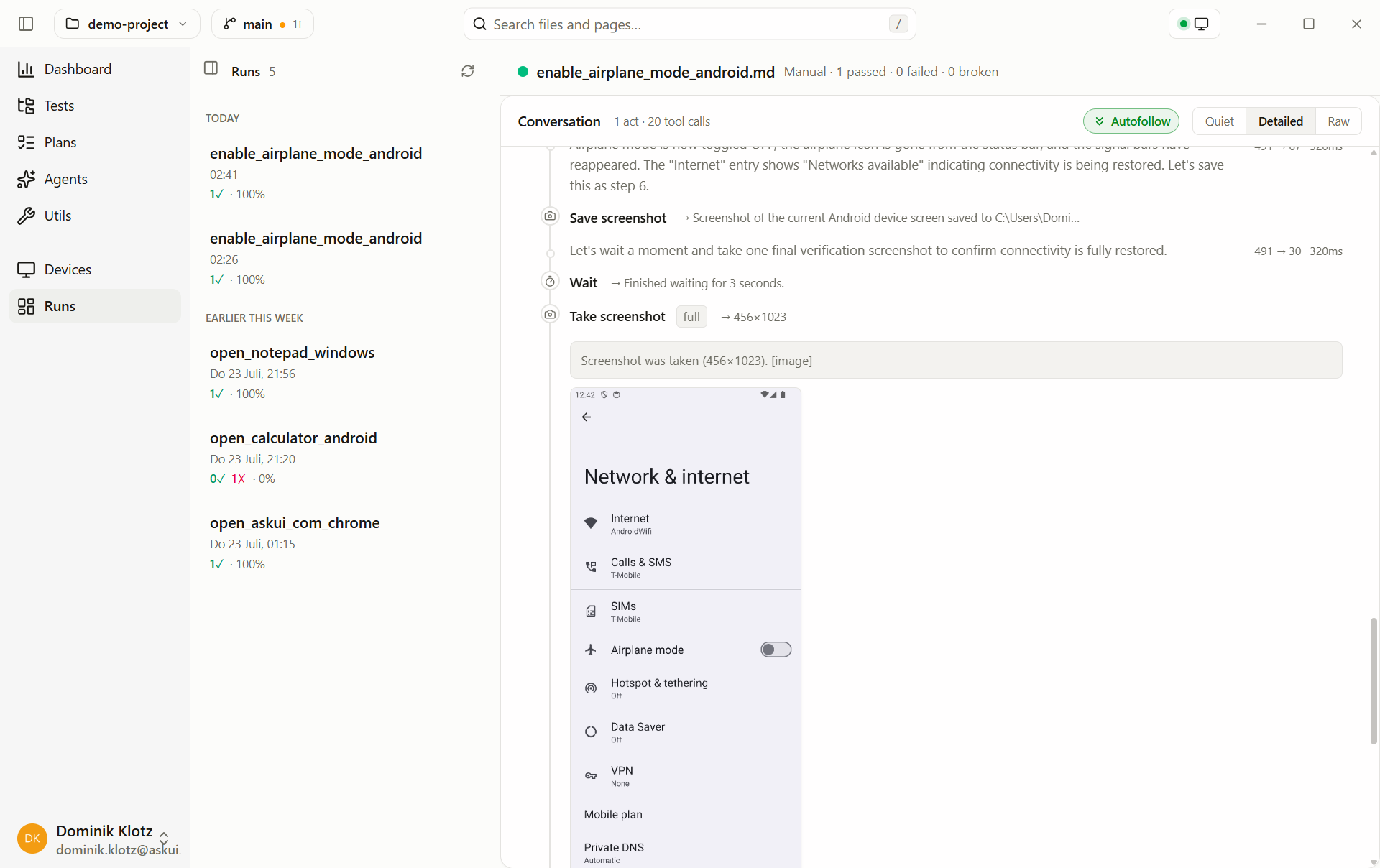
Reading it element by element:
- Numbered circle + TEST header: one phase (setup, a test case, teardown) with its file path, status badge (PASS/FAIL), and how many tool calls it took, this is where you see each test. Expanding a phase reveals a collapsed System prompt section, the exact standing instructions the agent received for that phase.
- Text lines: the agent's narration, what it sees on screen and what it decides to do next.
- Chips: tool calls, a screenshot, a keystroke, a click, or a named tool like Save screenshot / Write file, with the result behind it.
During a run the same view streams live, Watch it live.
Share results
To hand a result to a developer or attach it to a ticket, zip the run's timestamped folder (Open in Explorer on a test, one level up), the reports are plain Markdown with the step screenshots next to them, readable anywhere.
On disk
Each run is one timestamped folder under agent_workspace/:
<project>/agent_workspace/
└── 2026-07-23_21-56-55/          ← one folder per run
    ├── conversation.json          ← the conversation (the app re-renders it)
    ├── summary_report.md          ← run-level table
    └── open_notepad_windows/      ← one folder per test
        ├── open_notepad_windows_report.md   ← the test report
        ├── step_1.png
        └── step_2.png
Run folders are independent of each other, archive or delete old ones as
your evidence-retention policy requires; the Runs list and
Dashboard reflect whatever folders exist. The
folder is gitignored by design. From
the CLI, --output overrides the location.