

Web browser
A local browser window the app launches and drives itself, Chromium, Firefox, or WebKit.
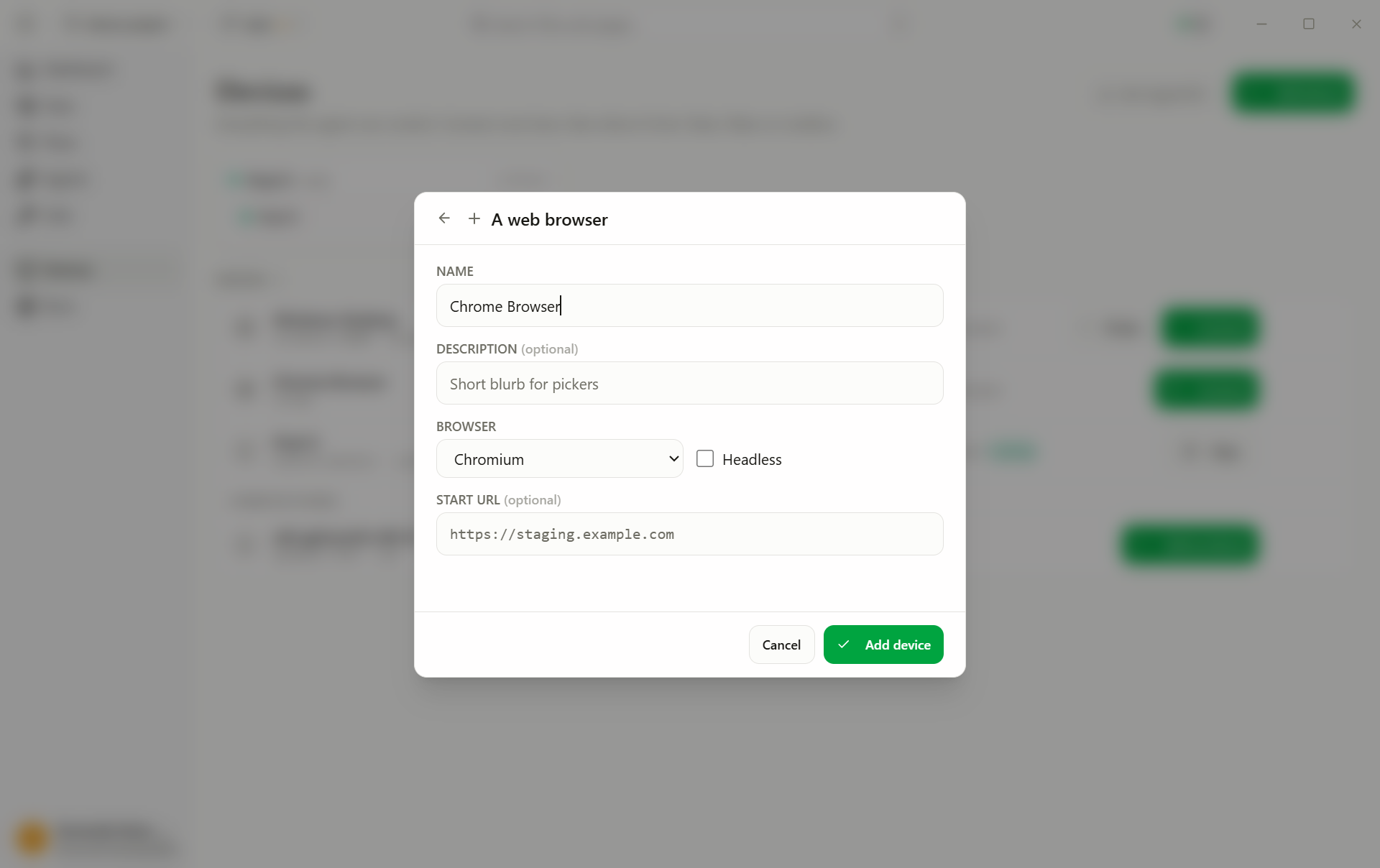
A Web browser profile tests web applications in a browser that AskUI Desktop launches and controls itself. No AgentOS, no separate install.
Create it
- Add device → Web browser.
- Fill in the fields:
- Browser: Chromium, Firefox, or WebKit (select, default
Chromium) - Start URL: full URL every session opens with, e.g.
https://staging.example.com(text, optional) - Headless: no visible window; the agent still sees the page through screenshots (toggle, default off)
- Browser: Chromium, Firefox, or WebKit (select, default
- Add device.
Run it
- Connect: the first connect downloads the browser bundle once, expect a short wait.
- Pick the profile in the test's Run on dropdown and press Run.
Headless keeps your screen free; use a visible window when you want to
watch. One profile per environment works well: Staging web app,
Prod smoke, same tests, different start URL.
Upload files
A test can upload files through a page's upload button or file field. Name the file by its full path in the step:
Click "Attach invoice" and upload C:\testdata\invoice.pdf.
Check that "invoice.pdf" appears in the attachment list.
No file dialog opens, in a visible window or headless. The agent learns from its own click that the page is waiting for a file, and hands the file over directly. You can watch this step in the run report as "File chooser answered with …".
- Any path works. The agent can upload any file the user running AskUI Desktop can read. On a CI runner, make sure the file exists at that path.
- Several files work when the field accepts several. A field that takes one file refuses more.
- Nothing selected. To test what the form does without a file, write "close the file picker without choosing a file".
- Not covered: pages that use the browser's newer folder and file access
picker (
showOpenFilePicker) instead of a file field. Most upload forms use a file field.
Confirmations and browser dialogs
When a page asks with a browser dialog (an alert, a "Really delete?"
confirmation, or a prompt for text), the agent reads the dialog's text and
answers it. Write the answer you expect into the step:
Delete the customer "Müller" and confirm the deletion.
Check that "Müller" is no longer in the list.- OK or Cancel. "Confirm" or "accept" presses OK. "Cancel" or "keep" presses Cancel, so the path where the user changes their mind can be tested too.
- Text prompts. Name the text, e.g. "enter Invoices as the folder name".
- Checking a message. The agent can check what an alert says, e.g. "check that the alert says Saved".
- In the run report each dialog appears with its text and the answer given.
The page waits while a dialog is open. Screenshots in the report show the page from just before the dialog opened, without the dialog drawn on it. This applies to the browser's own dialogs. Dialogs that a web app draws itself (modals) are part of the page, and the agent sees and clicks them like any other element.